/images/logo.png
A Network Blog by a Network Engineer

Junos Primary and Preferred Interface Commands

This blog post was spurred on by a recent real-world experience where I had to configure a primary IP address on an ISP facing interface. In this scenario, we needed to maintain the corporate ARIN assigned IP on an interface for VPN traffic to originate from and terminate on. Yet the ISP would only allow the customer to use the ISP provided IP address for BGP peering.

Fair warning, this is a bit of a long one and has a twist and turn. Also, take note that I am using interface overload NAT only for demonstration purposes.

There was some discussion around the primary and preferred interface commands, so why not learn more about it and, in turn, write a blog post about it.

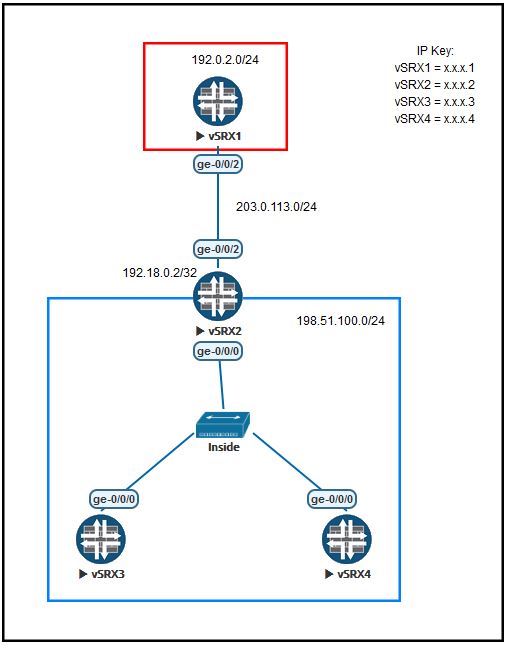
Below is the lab diagram we will use for this blog post. I have preconfigured the devices to pass traffic with vSRX2 set to NAT all internal traffic to its outside (ge-0/0/2) interface. vSRX1, vSRX3, and vSRX4 are all configured in packet mode to keep the configurations simple. You can find a copy of the eve-ng topology, starting configs, and ending configs at the end of this post.

Juniper JNCIE-CLOUD Announced

I know we all have our cloudy day (some of us more than others) yet if you are a cloud expert now is your opportunity to prove it. Juniper has announced a new expert-level certification called JNCIE-Cloud.

Now if you are like me, you are probably like what the heck and why do we need this. Why do we need an expert level on cloud certification? Well when you start to consider the number of companies today that are moving to a hybrid cloud data center, it does make sense. The challenge that companies face to intelligently integrate the public and private clouds is staggering.

What do I run at home?

I have decided to do a little series on “What I run at home” with regards to networking, labs, and other assorted items that may be of interest. As a techie, it is always interesting to find what other techies run at home.

Well, I figured it was my time to share as I have been running the same network at home for a few years and have been pleased with the performance and management.

Juniper NXTWORK Hack-a-Thon

Ein and Jkitty talking about hacking

Over the past couple of years, Juniper has hosted a Hackathon at start of NXTWORK. This event is a great way to meet new people, start to get in the groove of challenging technology and just have some fun. When you register for NXTWORK, there is an option to sign up for the Hackathon.

In 2017 we did a Red Team / Blue Team attach where the RED team was using Kali Linux to attach the Blue Team. We had to take advantage of OS and vendor exploits to gain access. The Blue Team was there monitoring and reporting on our activities as they could not stop (rules) us from entering their network.

Juniper JNCIE-ENT Refresh

A few months ago Juniper announced that the JNCIE-ENT lab exam would be getting a much-needed refresh. On November 1st will be saying goodbye to JPR-943 and hello to JPR-944. This new lab exam is also a 6-hour hands-on lab instead of the previous 8-hour hands-on.

I do plan to update my JNCIE-Workbook based on this new lab, yet have no definitive timeline to accomplish that task. While my workbook may not cover everything in the syllabus (EVPN, Space, Scripts) it seems as though much of it is still relevant. In honor of the new exam, here is a link to purchase the workbook for $49.99, that is half-off the normal price. Each purchase from LeanPub comes with a 30-day, money-back guarantee.

Testing at Juniper NXTWORK

Earlier this week I did a post on Juniper NXTWORK and talked about the event. There is a lot going on that week, but one of the best things is the FREE JCNP level certification testing that is available. I wanted to elaborate a bit more on the testing, how to register, and what to expect.

Let us start with the JNCIE lab exams that are available for 50% off. All of the JNCIE labs – ENT JPR-944, -CLOUD JPR-911, -SEC JPR-933, -DC JPR-980, and -SP JPR-960 – are available on the November 9th and 10th. The exam times are from 9 AM to 6 PM both days, except for the new ENT and CLOUD which are 6-hour exams. To register for a JNCIE lab exam, you must have the required JNCIP level certification and e-mail certification@juniper.net with your Full Name, Cert Manager ID (JPRxxxx), Exam Name, and what date you would like to take it. There is limited seating, so they are first come first serve.

Juniper NXTWORK 2019

What an amazing year it has been since the last Juniper NXTWORK event. We are heading back to Las Vegas, NV but this time we are at Ceasars Palace from 11-13 of November. While those are the conference dates, there are a few things going on the days before the conference you should be aware of.

Similar to last year, Juniper is offering a limited amount of discounted JNCIE labs on Saturday and Sunday (9th and 10th). I took the JNCIE-SEC lab at the event last year and the testing was just like if you took the test in their Herndon, VA location. You are remote to the equipment and provided a laptop to access everything with. If you are looking to take a JNCIE lab, this is a great opportunity to save some monies and give it a go! Once you register you can select that you want to book a lab and the Certification team will contact you.

Server Update

Ahh, the pains of neglecting certain aspects of your life ( like your webserver). Well, I finally showed it some love yesterday and put the old one to pasture and spun up a new one. You have to admire this day and age as it only takes a few minutes to spin up a server, get everything set, and migrate the data over.

Well, Fryguy.Net is on a new Digital Ocean droplet and I am working out the gremlins. It was a fairly simple migration, yet I have had to deal with a few issues due to some plug-ins no longer being supported or available.

Cisco Live 2019 – Recap

Umm, yeah I know that Cisco Live was like two months ago (ok three now) and I am finally getting around to writing my recap.  I think I waited so long as I don’t want to admit that it ended and I had to go home.    I will make this post brief as there are plenty of good Cisco Live recap posts out there already.
– NetworkingNerd
– Amy Engineer
– Lookingpoint
– PackIT Forwarding

Let me start with saying I was glad I was able to just make it there!  My flights, for two days, kept gitting canceled due to weather, it was crazy! Every time I was rebooked, that flight was either cancelled or would have gotten me into a connecting airport after all the flights left.  Sometimes travel challenges happen – I was just glad I was still at home and was able to rebook from my home airport.

[slideshow_deploy id=’5787′]

Cisco Live – Are you ready?

It is just about time for Cisco Live 2019!  Here are some quick things you should know before you go.

  • Bring a larger suitcase than you think you will need.  
    The reason for this is because you will probably get a new backpack, shirts, and other stuff from WoS that you will want to bring home.