/images/logo.png
A Network Blog by a Network Engineer

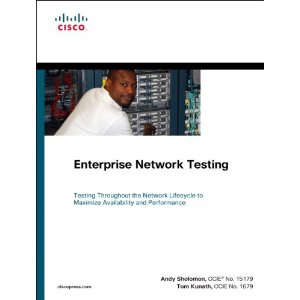
Cisco Press: Enterprise Network Testing

Enterprise Network Testing

 
Let me start off by saying that this is not the “normal” Cisco Press book where you learn technologies; no with this book you actually see how to use what you have learned and ways to approach the testing of those technologies.   This book covers the often neglected part of what we do, proper testing and planning.  It is refreshing to be able to read a book like this, it is heavy on the acronyms, but that is almost expected for a Cisco Press book anyways!
The book is divided into three main parts.  Part 1 – Introduction to Enterprise Network Testing, Part 2 – Case Studies, and Part 3 – Test plans.
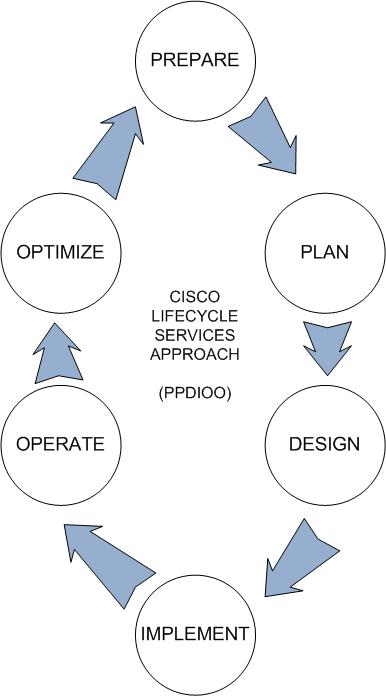
Part 1 reviews the basics of business cases, network life-cycles, testing and lab strategies, test approach, and finally, executing a test plan.  The Network Life-cycle is something that we know about but never tend to look at.  Not that we intentionally ignore it or anything, but I think most shops run a bit slim in the Network Engineering group and tend to have to support the business as well as take care of current projects.   It is sometimes nice just to be able and sit back and follow the PPDIOO, but alas those times are few and far between.  Below is a diagram that can act as a friendly reminder that we should do that more often then we do today.  Perhaps the material in this book is something that can help each of us remind the senior management about this process and they might start to understand the benefits that this approach can bring.


When it comes to the case studies of this book, they are some amazing studies!  They are not the small networks that you would think, they are larger networks and show you the thought that is behind the design phase. It can help you to understand the bigger picture of a design as well as provide a sheltered approach to larger network designs.  It is not everyday that we need to design a large MPLS network for a company, but if we ever need to support one we might have a better understanding of what we are looking at. The case studies walk you though the process discussed above, so you can start to see the actual application of the concepts – and thus be able to gain a better understanding of them.
The last part, Part 3, is all test plans.  These are very nice reference materials that can be looked back upon when you are designing.  They can help you to formulate your own test plans, and by referencing back you can make sure you do not miss anything.  There are numerous plans for different technologies – from DMVPN/GetVPN to Nexus to Wide Area Application Services.  They cover the whole 10 yards of information – everything you need to think about is there!
 
There are a few other gems in this book that surprised me.  When you think of testing a network, typically you take a router and use it for a single function.  In the beginning of this book they show you how to make 1 router into 100 routers in a relatively simple fashion.  I have done small scales of this in the past, but the way that they covered this approach was easy to understand and comprehend.  Another gem was the mention of the little know service, chargen, and how to use it in your test scenarios.  We very nice to see that mentioned – need to remember to use that one from time to time as I forgot about it!
Overall this is a very good book – one that I am glad is now in my Cisco Press library!
 

CCIE Lab at Cisco Live 2011


There was some quick conversation on Twitter this morning about the CCIE Lab being available during Cisco Live 2011.  Well, after some digging around I was able to find a copy of the ad that talks about the availability of the lab.  Based on what the ad says, seats are available on July 9th and July 10th only.  This lab can only be scheduled via the Cisco Live registration site, below are the instructions on how to schedule.
I have to say that this is a long time coming, and lets hope they continue this with – say – the CCDE!?!?  It does not say what CCIE labs will be available, and my best guess would be R&S only at this time.
UPDATE – 5/31 – It is my understanding (from a beautiful source) that the following CCIE Labs will be available:

Welcome. . .


Welcome to the new site!  I have recently moved the site from the WordPress hosted site so a new location.  This site is now reachable via blog.fryguy.net or www.fryguy.net, www.fryguy.net being the preferred method going forward.  I still need to finish up a few things here and there, but all the posts have been moved with all their content – so we should be good to go!
Why did I move it you may ask, well I just felt it was time to be able to branch out a bit.  I can now host video, flash, or anything else that suit my readers.
So, if you have any suggestions or ideas – just let me know!  Also, if you find any problems – please let me know so that I can correct them quickly.
Thank you, and again – Welcome!

DisplayLink Software


Scott – @scottm32768 on twitter – posted a link about this nifty piece of software called DisplayLink.  It caught my attention very quick as he said it makes your iPad into a display for your Windows 7 PC.  This is something I have been looking for for quite some time.  I have seen some of the people at my work do this with their Apple computers using either the DisplayLink software or another vendor’s I believe.
So why am I doing a post on it, well to help get the word out, that is why!  The DisplayLink application definitely helps to free up the real-estate on your computer as you can toss your Twitter application to it, your e-mail, perhaps a terminal application, or anything else you want to keep an eye on.  This additional real estate on our computers is wonderful!
From their website, they say that the key features are:

IPv6 – My IPv6 Tutor website


This is just a quick post on a new venture one of my good friends, Brandon, has embarked on.  Brandon is a well recognized and respected Cisco trainer in the industry and has published a few books for Cisco Press over the years.  His books include CCNA Wireless Official Exam Certification Guide and _Cisco Access Control Security _as well as a few others.
Recently he has decided to embark on another endeavor, and this one could not have better timing.  He is launching a website for IPv6 tutoring called MyIPv6Tutor.com
If you want to learn more about IPv6 and such, might be a good time to head over there and see what a Cisco Certified Systems Instructor has to say about IPv6!

Cisco Press :: IPv6 for Enterprise Networks

We have all been hearing about IPv6 for a few years now. There have been numerous white papers published, blog posts, audio podcasts, as well as the normal twitter chatter on the topic. Lately this topic has come to the forefront more and more since the RIR have handed out the last of the IPv4 /8 networks to the regional registrars. So what does all this mean to you and I? Well, if you have not fully embraced IPv6, the time has definitely come.
Luckily Cisco Press has recently released IPv6 for Enterprise Networks (Networking Technology) for our reading pleasure. Originally I was going to wait until Cisco Live 2011 to get this book, but I just could not wait and my friend, Jamie, was able to help me get it sooner. I am glad that I did not wait! This book is a great read and will help the reader to understand IPv6 as well as help to design and deploy a network.
The book consists of 12, well formatted chapters. They take you from the market drivers, to designing and services, deployment, and all the way to the data center and testing.  What is nice about this book is the progression on the topics.  You do not really need to know IPv6 to read this book, it will actually guide you through the whys and hows then onto the how to as well as testing.  It is nice to have a book that will cover most of the topics that one will experience in an Enterprise design.
The first two chapters in the book talk about the market drivers for IPv6, these are some of the whys that people are wondering.  This is a pretty quick chapter as the killer application is not really out there yet, but is sure to be coming (my best guess will be Asian/Pac e-commerce).  What this chapter does elude to is that this is a good time to be able to restructure your network in a more efficient design.  Consider this, you probably inherited your current network and the design that is currently in place.  With a transition to IPv6, you now have the opportunity to reconsider what was done and determine were you should take it.  The first chapter does good at giving you some points to consider as you read on and helps you to understand some of the underlying design scenarios.
The next two chapters, 3 and 4, start to go over how IPv4 and IPv6 will co-exist in the network and some of the ways to approach this challenge.  There are dual-stacking, 6-to-4 tunnels, MPLS, and the good old duct tape of the network – GRE.  It also continues to talk about services and some of the routing options that one has to consider.  Service such as multicast and QoS are discussed for a decent amount of pages.  These tend to be some of the more important items in an enterprise network.  These chapters also discuss the different routing protocol options – OSPFv3, EIGRPv6, and IS-IS with a mention of BGP.  What does surprise me, there is no discussion on LISP 🙂  Ok, that might have been asking for a bit much, but I do like LISP.
I think that Chapter 5 is a really important chapter in some ways.  This is the chapter where Planning an IPv6 Deployment is discussed.  This is a topic that should not be taken lightly but one that should be a primary focus.  After all the technology and numbers, all that you really have to stand upon is good design.  As i mentioned before, what is nice with IPv6 is that you do not have to base your new design on the existing design, you can actually rethink everything and start fresh.  For instance, if you are currently running EIGRP but want to move to OSPF, deploying IPv6 is the time to start that move.  The two protocols (v4 and v6) are separate from each other.
The next chapters, 6 through 10, are the heart of this book.  Discussed in some good detail is deploying IPv6 in Campus, Virtualized, WAN/Branch, Data Centers as well as Remote Access.  Each of these topics has a good chapter dedicated to it and there are many things that one needs to consider with each of these deployment scenarios.  Again, it all comes down to the choices made during the design and testing phase.
Chapter 11 is a nice chapter on the aspects of Managing IPv6 Networks.  It covers the different ways to monitor and secure various parts of the network.  It is nice to actually see a chapter dedicated to some of the stuff that is quickly overlooked during a design an deployment – how to manage and support all the work that you have done.  Most of this stuff is usually figured out near the end of a project when we hand off things to the NOC – and they say IPvWhat?
The final chapter in the book was a welcomed surprise to me.  This chapter actually talks about how to setup a lab to test IPv6.  It gives some good sample setups that should help the person be able to play with the protocol as well as test different scenarios.  Granted, some of the hardware suggested might be a bit out of reach for most of us (VSS, ISR, etc) – but it is a good starting point to see what you can do.  One can easily see ways to substitute certain hardware for other hardware so one can learn and develop.  If you are going to roll some of this into production, test hardware is invaluable for knowing the problems before they are experienced in a live network.
Overall it is a good read and one that should be handy to those who are working with IPv6 right now.  Not only can you use the information within the book for your own knowledge, but it gives you information on how you can explain it to others.  One of the most difficult things that I come across in an enterprise is explaining difficult topics.  This book helps me to find ways to explain things in ways that others might be able to understand.

Cisco Live 2011 Schedule

[][1]
Schedule
Figured I would put up a quick post with my current Cisco Live class schedule. This is my schedule as of today and, as always, is subject to change. All times are in Vegas time!
Saturday
Fly and check in at Mandalay Bay as well as register for the event
Sunday
8:00 – 17:00TECDCT-8001Next Generation Data Center Infrastructure
Monday9:30 – 11:30BRKARC-3470Cisco Nexus 7000 Switch Architecture
12:30 – 14:30BRKARC-3471Cisco NXOS Software – Architecture
15:00 – 17:00BRKRST-2335IS-IS Network Design and Deployment
Tuesday8:00 – 9:30BRKRST-3045LISP – A Next Generation Networking Architecture
10:00 – 11:00GENKEY-4700Keynote and Welcome Address
12:30 – 14:30
15:00 – 15:30
BRKCOM-1005
GENNOC-9190
UCS Systems Architecture Overview
Cisco Live NOC Tour (CCIE/NetVet)
16:00 – 18:00BRKCRS-3144Troubleshooting Cisco Nexus 7000 Series Switches
Wednesday
8:00 – 10:00BRKCOM-2006UCS Reference Architecture for Enterprise Applications
10:30 – 11:30GENKEY-4701Cisco Technology Keynote
12:30 – 14:30BRKDCT-2121Virtual Device Context (VDC) Designing and Implementation Considerations with Nexus
16:00 – 18:00BRKVIR-3013Deploying and Troubleshooting the Nexus 1000V virtual switch
Thursday
8:00 – 10:00BRKCOM-1002Data Center Architectures and Virtual Private Data Centers with UCS
10:30 – 11:30GENDCT-4642Town Hall: Data Center
12:00 – 14:00BRKARC-3472NX-OS Routing & Layer 3 Switching
14:30 – 15:30GENKEY-4702Closing Keynote: William Shatner
16:00 – 17:30BRKMPL-2108Global WAN Redesign Case Study
Friday
Fly home!

Cisco Live 2011 – Why you should go. . .

Well, it is almost that time a year when all the “Networkers” get together at the annual Cisco Live event. It is still a few months away when I am writing this – but as we all know – time slows down for no one.  I wanted to take a few moments and share with you why I attend as well as why you should consider attending.   Please keep in mind that my experience is a bit different from the normal attendee as I am considered a NetVet as well as a CCIE, and being that we get a few additional perks during the event.

More LiSP – using it to enable IPv6 over IPv4


Ok, now that I have that basic LISP post out, you know this one LISP – Say What?!, I figured I would build upon that configuration. Today I will show you how to overlay IPv6 at your sites while keeping your core IPv4 only.  There is no IPv6 addressing nor routing configured on the core Routers and this post will continue where the other one left off, no configuration changes have been made prior to this post, except I did have to upgrade from a base image to an Enterprise image to support IPv6 on R2, R3, and R4.  R1 is still running an IOS that does not support LISP nor IPv6.  This post will focus on the configuration first and then the explanation of how last.
Below is the same topology I used in the other LISP post, just added some IPv6 addressing and routing protocols for Site-A and Site-B. I am going to build on what we have done in the other lab, so not all the necessary LISP configs are here for a scratch-built config.  I have included the full configs in the bottom of this post if you would like to look at them.

Quick rundown on color codes again:
Router Output
Notes
Commands
Lets start with R4, the LISP MS/MR device.  We will configure this to accept the IPv6 networks to the xTR routers at Site A and Site B
We need to enable IPv6 Routing on R4.  There will no no IPv6 interfaces, but it still needs to understand how to route IPv6 for when a request comes in
LISP_R4_MP_MR(config)# ipv6 unicast-routing
Now we need to enable the IPv6 address family under the VRF, just like we did for IPv4.
LISP_R4_MP_MR(config)# vrf definition lisp
LISP_R4_MP_MR(config-vrf)# rd 1:1
LISP_R4_MP_MR(config-vrf)# address-family ipv6
LISP_R4_MP_MR(config-vrf-af)# exit-address-family
Now enable LISP to be a map-server and resolver for IPv6
LISP_R4_MP_MR(config)# ipv6 lisp map-server
LISP_R4_MP_MR(config)# ipv6 lisp map-resolver
And just like IPv4, we need to add the IPv6 networks for the mappings for Site A and Site B
LISP_R4_MP_MR(config)# lisp site Site-A
LISP_R4_MP_MR(config-lisp-site)# eid-prefix 2001:DB8:0:1::/64 accept-more-specifics
LISP_R4_MP_MR(config-lisp-site)# eid-prefix 2001:DB8:0:2::/64 accept-more-specifics
LISP_R4_MP_MR(config-lisp-site)# eid-prefix 2001:DB8:0:3::/64 accept-more-specifics
LISP_R4_MP_MR(config-lisp-site)# eid-prefix 2001:DB8:0:25::/64 accept-more-specifics
LISP_R4_MP_MR(config)# lisp site Site-B
LISP_R4_MP_MR(config-lisp-site)# eid-prefix 2001:DB8:0:1001::/64 accept-more-specifics
LISP_R4_MP_MR(config-lisp-site)# eid-prefix 2001:DB8:0:1002::/64 accept-more-specifics
LISP_R4_MP_MR(config-lisp-site)# eid-prefix 2001:DB8:0:1003::/64 accept-more-specifics
LISP_R4_MP_MR(config-lisp-site)# eid-prefix 2001:DB8:0:1036::/64 accept-more-specifics
That is all that is necessary on R4 in order for LISP.  Just to prove there is no IPv6 configured:
LISP_R4_MP_MR# sh ipv int br
GigabitEthernet0/0         [up/up]
unassigned
Now, lets to the other two routers that are not part of LISP, namely R5 and R6.
R5 first
First we will enable IPv6 routing
LISP_R5(config)# ipv6 unicast-routing
Configure and enable IPv6 OSPF process 1
LISP_R5(config)# ipv6 router ospf 1
LISP_R5(config-rtr)# log-adjacency-changes
Now we can assign our IPv6 addresses to our existing Loopback addresses and place these interfaces into OSPF PID 1 Area 0
LISP_R5(config)# interface Loopback1
LISP_R5(config-if)# ipv6 address 2001:DB8:0:1::5/64
LISP_R5(config-if)# ipv6 ospf 1 area 0
LISP_R5(config)# interface Loopback2
LISP_R5(config-if)# ipv6 address 2001:DB8:0:2::5/64
LISP_R5(config-if)# ipv6 ospf 1 area 0
LISP_R5(config)#  interface Loopback3
LISP_R5(config-if)# ipv6 address 2001:DB8:0:3::5/64
LISP_R5(config-if)# ipv6 ospf 1 area 0
LISP_R5(config)# interface FastEthernet0/1
LISP_R5(config-if)# ipv6 address 2001:DB8:0:25::5/64
LISP_R5(config-if)# ipv6 ospf 1 area 0
That is all that is needed for R5.  The reason we created an OSPF process is so that we can learn an IPv6 default ( ::/0 ) route from R2
now R6
Just like R5, we will enable IPv6 routing.
LISP_R6(config)# ipv6 unicast-routing
Then create the IPv6 OSPF Process 1
LISP_R6(config)# ipv6 router ospf 1
LISP_R6(config-rtr)# log-adjacency-changes
Now we will assign the IPv6 addresses to the interfaces as well as place the interfaces in IPv6 OSPF Process ID 1, Area 0
LISP_R6(config)# interface Loopback1
LISP_R6(config-if)# ipv6 address 2001:DB8:0:1001::6/64
LISP_R6(config-if)# ipv6 ospf 1 area 0
LISP_R6(config)# interface Loopback2
LISP_R6(config-if)# ipv6 address 2001:DB8:0:1002::6/64
LISP_R6(config-if)# ipv6 ospf 1 area 0
LISP_R6(config)# interface Loopback3
LISP_R6(config-if)# ipv6 address 2001:DB8:0:1003::6/64
LISP_R6(config-if)# ipv6 ospf 1 area 0
LISP_R6(config)# interface GigabitEthernet0/1
LISP_R6(config-if)# ipv6 address 2001:DB8:0:1036::6/64
LISP_R6(config-if)# ipv6 ospf 1 area 0
Again, that is all for R6.  And just like R5, we created OSPF so that we can learn an IPv6 default ( ::/0 ) route from R3
So, now we can configure our xTR routers – R2 and R3.  R2 first
R2
Again, we need to enable IPv6 on these devices
LISP_R2(config)# ipv6 unicast-routing
Now we create the IPv6 OSPF process and configure it to generate the default route ( ::/0 ) to R5
LISP_R2(config)# ipv6 router ospf 1
LISP_R2(config-rtr)# default-information originate always
There are no configuration changes on G0/0, it maintains its IPv4 address – there is NO IPv6 configured on this interface.
LISP_R2(config)# interface GigabitEthernet0/0
Now we can configure the EID side of the network with IPv6 and place the interface into IPv6 OSPF PID 1, Area 0
LISP_R2(config)# interface GigabitEthernet0/1
LISP_R2(config-if)# ipv6 address 2001:DB8:0:25::2/64
LISP_R2(config-if)# ipv6 ospf 1 area 0
Now we can configure this device to be an xTR and the associated LISP map-resolver and LISP map-server
LISP_R2(config)# ipv6 lisp itr
LISP_R2(config)# ipv6 lisp itr map-resolver 10.1.14.4
LISP_R2(config)# ipv6 lisp etr
LISP_R2(config)# ipv6 lisp etr map-server 10.1.14.4 key Fryguy
Now we have to tell the MR/MS what EIDs are reachable via our RLOC interface
LISP_R2(config)# ipv6 lisp database-mapping 2001:DB8:0:1::/64 IPv4-interface GigabitEthernet0/0 priority 1 weight 100
LISP_R2(config)# ipv6 lisp database-mapping 2001:DB8:0:2::/64 IPv4-interface GigabitEthernet0/0 priority 1 weight 100
LISP_R2(config)# ipv6 lisp database-mapping 2001:DB8:0:3::/64 IPv4-interface GigabitEthernet0/0 priority 1 weight 100
LISP_R2(config)# ipv6 lisp database-mapping 2001:DB8:0:25::/64 IPv4-interface GigabitEthernet0/0 priority 1 weight 100
Now onto R3
R3
Like all the other routes, we will enable IPv6
LISP_R3(config)# ipv6 unicast-routing
…and configure OSPF PID 1. Again, configuring the router to generate the ::/0 route for R6
LISP_R3(config)# ipv6 router ospf 1
LISP_R3(config-rtr)# default-information originate always
Now we an configure the IPv6 side of the router, and as with all the other routers, place the interface into OSPF
LISP_R3(config)# interface GigabitEthernet0/0
LISP_R3(config-if)# ipv6 address 2001:DB8:0:1036::3/64
LISP_R3(config-if)# ipv6 ospf 1 area 0
Again, we do not make any changes to the LISP RLOC interface, no IPv6 on this interface!
LISP_R3(config)# interface GigabitEthernet0/1
Now we can configure the router to be an xTR with the MS/MR of 10.1.14.4
LISP_R3(config)# ipv6 lisp itr
LISP_R3(config)# ipv6 lisp itr map-resolver 10.1.14.4
LISP_R3(config)# ipv6 lisp etr
LISP_R3(config)# ipv6 lisp etr map-server 10.1.14.4 key Fryguy
And now all the database mappings for the EIDs that are reachable via the RLOC interface
LISP_R3(config)# ipv6 lisp database-mapping 2001:DB8:0:1000::/54 IPv4-interface GigabitEthernet0/1 priority 1 weight 100
LISP_R3(config)# ipv6 lisp database-mapping 2001:DB8:0:1001::/64 IPv4-interface GigabitEthernet0/1 priority 1 weight 100
LISP_R3(config)# ipv6 lisp database-mapping 2001:DB8:0:1002::/64 IPv4-interface GigabitEthernet0/1 priority 1 weight 100
LISP_R3(config)# ipv6 lisp database-mapping 2001:DB8:0:1003::/64 IPv4-interface GigabitEthernet0/1 priority 1 weight 100
LISP_R3(config)# ipv6 lisp database-mapping 2001:DB8:0:1036::/64 IPv4-interface GigabitEthernet0/1 priority 1 weight 100
So, now that everything is configured, lets do a PING from R5 Loopback1 to R6 Loopback1
LISP_R5# ping ipv6 2001:DB8:0:1001::6 source loopback 1
Type escape sequence to abort.
Sending 5, 100-byte ICMP Echos to 2001:DB8:0:1001::6, timeout is 2 seconds:
.!!!!
Success rate is 80 percent (4/5), round-trip min/avg/max = 1/2/4 ms
LISP_R5#
There we go, it worked!  LISP allowed us to encapsulate the IPv6 packet within IPv4 without have to configure 6to4 tunnels and such.
Why?  Well, LISP encapsulate the original packet when it goes from one RLOC to the other RLOC 🙂
Now that we have that all configured and tested, lets look at the output from R4 using a the command sh lisp site summary. As you will see, we now have 4 configured networks for IPv6 and 4 registered.  Our IPv4 routes and networks are still there from before, none of that changed.
LISP_R4_MP_MR# sh lisp site summary

…………………….———– IPv4 ———–……….———– IPv6 ———–
Site name……….Configured Registered Incons Configured Registered Incons
Site-A…………………………2……………2……….……………4…………….4……….
Site-B…………………………2…………….2……….…………..4…………….4……….
Number of configured sites:……………………..2
Number of registered sites:………………………2
Sites with inconsistent registrations:………….
IPv4
..Number of configured EID prefixes:…………..4
..Number of registered EID prefixes:……………4
IPv6
..Number of configured EID prefixes:…………..8
..Number of registered EID prefixes:……………8
LISP_R4_MP_MR#
Now we can look at the output from show lisp site to see what networks are registered.  As you can see, both IPv4 and Ipv6 networks are listed with their perspective RLOC routers.

LISP_R4_MP_MR# sh lisp site
LISP Site Registration Information
Site Name      Last      Up   Who Last             Inst     EID Prefix
Register       Registered           ID
Site-A         00:00:02  yes  10.1.12.2                     150.1.25.0/24
…………….00:00:02  yes  10.1.12.2                     150.1.125.0/24
……………. 00:00:07  yes  10.1.12.2                     2001:DB8:0:1::/64
……………. 00:00:07  yes  10.1.12.2                     2001:DB8:0:2::/64
……………. 00:00:07  yes  10.1.12.2                     2001:DB8:0:3::/64
……………. 00:00:07  yes  10.1.12.2                     2001:DB8:0:25::/64
Site-B         00:00:53  yes  10.1.13.3                     150.1.36.0/24
……………. 00:00:53  yes  10.1.13.3                     150.1.136.0/24
……………. 00:00:10  yes  10.1.13.3                     2001:DB8:0:1001::/64
……………. 00:00:10  yes  10.1.13.3                     2001:DB8:0:1002::/64
……………. 00:00:10  yes  10.1.13.3                     2001:DB8:0:1003::/64
……………. 00:00:10  yes  10.1.13.3                     2001:DB8:0:1036::/64
LISP_R4_MP_MR#
Now, just like I did for the IPv4 only lab, here is the debug output from debug lisp control-plane all. If you need an explanation, just refer to the prior post please.

LISP_R2# debug lisp control-plane all
LISP_R2#
*Apr  8 22:18:21.098: LISP: Processing data signal for EID prefix 2001:DB8:0:1001::6/128
*Apr  8 22:18:21.098: LISP: Remote EID prefix 2001:DB8:0:1001::6/128, Change state to incomplete (method: data-signal, state: unknown, rlocs: 0).
*Apr  8 22:18:21.098: LISP: Remote EID prefix 2001:DB8:0:1001::6/128, Scheduling map requests (incomplete) (method: data-signal, state: incomplete, rlocs: 0).
*Apr  8 22:18:21.130: LISP: Send map request for EID prefix 2001:DB8:0:1001::6/128
*Apr  8 22:18:21.130: LISP: Remote EID prefix 2001:DB8:0:1001::6/128, Send map request (1) (method: data-signal, state: incomplete, rlocs: 0).
*Apr  8 22:18:21.130: LISP: AF IPv6, Sending map-request from 2001:DB8:0:25::2 to 2001:DB8:0:1001::6 for EID 2001:DB8:0:1001::6/128, ITR-RLOCs 1, nonce 0xC4B2E8BE-0x4DCA442F (encap src 10.1.12.2, dst 10.1.14.4).
*Apr  8 22:18:21.130: LISP: Processing received Map-Reply message from 10.1.13.3 to 10.1.12.2
*Apr  8 22:18:21.130: LISP: Received map reply nonce 0xC4B2E8BE-
LISP_R2#0x4DCA442F, records 1
*Apr  8 22:18:21.130: LISP: Map Request prefix 2001:DB8:0:1001::6/128 remote EID prefix, Received reply with rtt 0ms.
*Apr  8 22:18:21.130: LISP: Processing mapping information for EID prefix 2001:DB8:0:1001::/64
*Apr  8 22:18:21.130: LISP: Remote EID prefix 2001:DB8:0:1001::/64, Change state to complete (method: map-reply, state: unknown, rlocs: 0).
*Apr  8 22:18:21.130: LISP: Remote EID prefix 2001:DB8:0:1001::/64, Starting idle timer (method: map-reply, state: complete, rlocs: 0).
*Apr  8 22:18:21.130: LISP: Remote EID prefix 2001:DB8:0:1001::6/128, Change state to deleted (method: data-signal, state: incomplete, rlocs: 0).
*Apr  8 22:18:21.134: LISP: Remote EID prefix 2001:DB8:0:1001::/64, Recalculated RLOC status bits from 0x0 to 0x1 (method: map-reply, state: complete, rlocs: 1).
*Apr  8 22:18:21.134: LISP RIB_RWATCH: (default:ipv4:base) T 10.1.13.3/32 EVENT Track start
*Apr  8 22:18:21.134: LISP RIB_RWATCH: (default:ipv4:base) N 10.1.13.3/32 Adding track
*Apr  8 22:18:21.134: LISP RIB_RWATCH: (default:ipv4:base) N 10.1.13.3/32 QP Schedule query
*Apr  8 22:18:21.134: LISP RIB_RWATCH: (default:ipv4:base) T 10.1.13.3/32 EVENT Query found route
*Apr  8 22:18:21.134: LISP RIB_RWATCH: (default:ipv4:base) R 10.0.0.0/8  d=1 p=1 -> 10.1.12.1 (base) 0 Updating
*Apr  8 22:18:21.134: LISP RIB_RWATCH: Adding to client notification queue
*Apr  8 22:18:21.134: LISP: Remote EID prefix 2001:DB8:0:1001::/64 locator 10.1.13.3 priority 1 weight 100, Added locator (method: map-reply, state: complete, rlocs: 1).
*Apr  8 22:18:21.134: LISP RIB_RWATCH: (default:ipv4:base) W 10.1.13.3/32 c=0x69B38AB8 Client notified reachable
LISP_R2#
LISP_R2#
Now from R5 I will ping the rest of the IPv6 interfaces on R6:
LISP_R5# ping ipv6 2001:DB8:0:1002::6 source loopback 1
Type escape sequence to abort.
Sending 5, 100-byte ICMP Echos to 2001:DB8:0:1002::6, timeout is 2 seconds:
.!!!!
Success rate is 80 percent (4/5), round-trip min/avg/max = 1/2/4 ms
LISP_R5# ping ipv6 2001:DB8:0:1003::6 source loopback 1
Type escape sequence to abort.
Sending 5, 100-byte ICMP Echos to 2001:DB8:0:1003::6, timeout is 2 seconds:
.!!!!
Success rate is 80 percent (4/5), round-trip min/avg/max = 1/2/4 ms
LISP_R5#
This way we can now look at the R2 LISP Map Cache
LISP_R2# sh ipv6 lisp map-cache
LISP IPv6 Mapping Cache, 4 entries
::/0, uptime: 00:11:01, expires: never, via static
Negative cache entry, action: send-map-request
2001:DB8:0:1001::/64, uptime: 00:10:50, expires: 23:49:02, via map-reply, complete
Locator    Uptime    State      Pri/Wgt
10.1.13.3 00:10:50  up           1/100
2001:DB8:0:1002::/64, uptime: 00:00:07, expires: 23:59:45, via map-reply, complete
Locator    Uptime    State      Pri/Wgt
10.1.13.3 00:00:07  up           1/100
2001:DB8:0:1003::/64, uptime: 00:00:02, expires: 23:59:50, via map-reply, complete
Locator    Uptime    State      Pri/Wgt
10.1.13.3 00:00:02  up           1/100
LISP_R2#
As you can see, all the IPv6 routes are reachable via 10.1.13.3 – an IPv4 address 🙂
Here are the configs for the routers
R1
R2
R3
R4
R5
R6