CCIE Data Center – It Looks To Be Real!
![ccie grey[1]](/wp-content/uploads/2012/02/ccie_grey1.jpg)
While I was doing my Cisco Live 2012 registration, I noticed something new listed for a Techtorial:

Once I clicked on it -my eyes lit up:
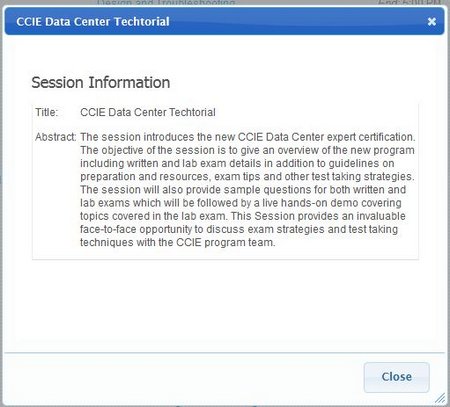
There will be a CCIE Data Center – YEAH BOI!

While I was doing my Cisco Live 2012 registration, I noticed something new listed for a Techtorial:
Once I clicked on it -my eyes lit up:
There will be a CCIE Data Center – YEAH BOI!
It is just 6 months away from the next Cisco Live US event, my how time flies. I just wanted to take a moment and share a quick link with you on the event – they (Cisco Live) is asking for your help in choosing the next bag – you can find the poll here: http://t.co/gWgIxc4b
Some quick images can be seen here, you can see more detailed images on their site. They do say that these are NOT the actual bag, nor to scale – but ideas that they are looking at.
My personal preference looking at these is either the backpack or the duffle bag. To be honest, the Duffle Bag might actually make some more sense – it will help get all the freebies home (More space). But, a backpack is always a safe bet.
See what happens in June!

Well, it has finally come time for me to make a new start in my professional life. Recently I have resigned from my position – Manager of US Network Engineering -at my former employer, KGB. Now, I work for NTT America (www.ntta.com) as Senior Network Engineer, Data Center Services (www.dedicatedserver.com ) . In my new role I will be working with some of the latest technology, cutting edge soltions, data center design, and just all around uber geek stuff. This will be a big change from what I was doing – Managing a team as well as being the Sr Network Engineer, but NTTA is the right place for me to be.
 It is just about that time in America were we gather around the table and enjoy a good mean with family in the honor of Thanksgiving. It is our American tradition to get with family and eat turkey, stuffing, and all-in-all pig-out (and watch some American Football) with people we have not seen since last Christmas or Thanksgiving. So, in the spirit of Safety for those of you who want to Fry your turkey, I present you the Alton Brown (Good Eats) special on Turkey Frying! He has some great tips on how to prepare the turkey, but most important – The Turkey Derrick
On October 26th I attended the OpenFlow Symposium in San Jose, CA hosted by Packet Pushers and TechFieldDay at the DoubleTree San Jose. The purpose of this symposium was to help gain more exposure to OpenFlow as well as discuss what some of the major players see and feel about the technology. In attendance was representatives from Big Switch Networks, Brocade, Cisco, Google, Juniper, NEC, and Yahoo!. They each were allowed to present their views and feelings and then the panel was opened up for discussion and questions.
My take was that Google and Yahoo! are big into this technology as they have the most to gain from it. They run warehouse size data centers all over the world, and this type of technology has a huge benefit to them as it means they can develop their own controllers and control merchant silicon, thus releasing them from relying on other vendors network hardware to support their data center. Not only that, but they can help prioritize and track individual flows based on what the user is doing. For example – a person who is placing items in their carts and heading to checkout can have a higher priority flow over someone just looking around. The speed to finish the transaction is important to them, not to mention they can also secure that traffic in the network differently then a person who is just looking.

An OpenFlow Symposium was held in San Jose, CA on October 26th, 2011 and hosted by by PacketPushers.Net and TechFieldDay.Com. This was my first true exposure to the OpenFlow protocol and concepts of SDN (Software Designed Networking), and it was a great exposure.
If you are not familiar with OpenFlow or SDN, please let me take a moment and give you a brief overview and a quick scenario. OpenFlow is a way in which you can have a application – called a Controller – maintain and control switch flow tables. This controller is aware of all flows in the topology of its domain, the domain being the switches/ports that it controls. Yes, you can have specific ports on a switch controlled via the controller, and all the other ports as part of a normal network that is controlled via the switch. OpenFlow will have no impact to the other ports, they will continue to operate just like nothing was different.
A good use case for OpenFlow is Multi-Path Layer 2 switching in a data center or other high bandwidth location. With normal multi-patch technologies one of the links is blocked via STP, thus sitting idle just waiting for the primary link to fail. With OpenFlow, the controller is aware of all paths in the network and able to load the traffic accordingly. Lets take a look at the following diagram:
Well, the week has come – its time for Network Field Day #2 as well as OpenFlow Symposium that is being hosted by Gestalt IT and PacketPushers.Net. This is going to be a week of drinking from the firehose, that is for sure – but I would not have it any other way!
The OpenFlow Symposium is on Wednesday, 10/26 – the Network Field Day is on 10/27 and 10/28. Both events will be streamed, and below are the streams for your viewing pleasure.
Or, you can check them out at:

This was posted on twitter today and just had to share it with you. It takes a few moments until you see what is so funny, but just wait – you will cry laughing.

This is a different type of post – one that I have not done here before but have considered for quite some time – it is an opinion post. I will occasionally take a few moments and explain my view of a topic that is hot in the news, world, or perhaps something that is being discussed on Twitter / Facebook / Google+.
It is not my intention to offend anyone, persuade anyone, or change your mind – but more of an avenue for my to spill my thoughts and feelings.
Ok, pleasantries out of the way now – lets get onto the topic here: Personal View – BoA ATM/Visa Fee
So, Bank of America wants to charge its “customers” a $5 fee per month that they use their debit/visa card for purchases unless you maintain $20,000 in deposits or have a mortgage with them ( NY Times 9/30/2011 ). They are joining all the other banks that are doing this or talking about it as well – Chase, Wells Fargo, and others – and all this is because the government has imposed limits on fees charged to merchants. Since the government has decided to step in and “protect the merchant” from extra fees, those fees are being made up on the consumer now. Of course, the merchants are not lowering prices on their items, so we can see how well that all worked out for us now, eh? But I digress.

In continuation of my previous posts on MPLS, lets talk about EIGRP as the PE to CE protocol.
Now while one might initially think that this is just as easy as RIP and Static routes, there are some added complexities with EIGRP. What complexities am I referring to? Well when configuring EIGRP on a PE router one needs to be aware of the Autonomous System number relationship. Normally you just create router eigrp AS and that is all you do, but when you have a PE router you need to use the address-family command and then specifically the autonomous-system # for that VRF. This has a big of complexities, but nothing that is a big deal. Just one more thing to remember.
So, lets add EIGRP AS 14 to VRF Green (R1 and R4) as well as the PE (R2 and R5) and configure redistribution. For reference I have already removed the RIP configurations.
First up, the CE routers:
R1:
Rack1R1(config)#router eigrp 14
Rack1R1(config-router)#no au
Rack1R1(config-router)#net 192.168.253.1 0.0.0.0
Rack1R1(config-router)#net 192.168.21.1 0.0.0.0
R4:
Rack1R4(config)#router eigrp 14
Rack1R4(config-router)#no au
Rack1R4(config-router)#net 192.168.253.4 0.0.0.0
Rack1R4(config-router)#net 192.168.54.4 0.0.0.0