Cisco Live 2012 Photos

Below are some of the photos I took during Cisco Live 2012.
I will be doing a follow-up post shortly.
Note: If you are reading this from the main page, you will need to click the post to see the pictures.

Below are some of the photos I took during Cisco Live 2012.
I will be doing a follow-up post shortly.
Note: If you are reading this from the main page, you will need to click the post to see the pictures.
Well, Cisco Live 2012 is only a week away – and where has the time gone! Since we are now oh so close to the event, I figured I would post a quick – know before you go post.
First:
There will be no USB drive this year with the presentations on it (boo!), so you will need to download them now so you have them for the sessions. In order to download them, you need to go to log into your scheduler at https://www.ciscolive2012.com/scheduler/catalog.do and then select the PDF icon next to your scheduled sessions. (Circled in RED in the below pic)
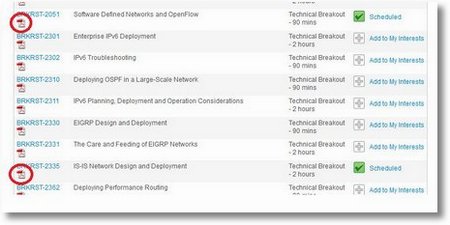
My suggestion is to download them to a location like Dropbox (http://db.tt/zjuOs7o) so that you can access them from anywhere. I personally download them to Dropbox and then sync the dropbox to my iPad GoodReader application. Works like a charm! If you have not guessed, I do not carry a laptop during the event, an iPad is sufficient.
**Second:
** Leave some extra space in your luggage. Do not underestimate the potential for free stuff from some of the vendors. Normally you will get about a dozen shirts from the World of Solutions, pleny of swag there as well, probably a free hat at the Customer Appreciation Event, and you might even choose to bring home things for co-workers of family.
Leaving some extra room in your luggage now never hurts.
**Third:
In continuation of my Cisco IOS XR posts, this one will be on how to install license files on the Cisco IOS XR code train.
The following L3VPN licenses are available for Cisco IOS XR:
L3VPN License | Feature | Low Quueue Line Card | Medium Queue Line Card | High Queue Line Card |
| A9K-IVRF-LIC | Up to 8 VRF | X | X | X |
| A9K-AIP-LIC-B | Full-Scale VRF | X | X | N/A |
| A9K-AIP-LIC-E | Full-Scale VRF | N/A | N/A | X |
So, lets get on with this and the ever loving Cisco licensing – well, not just Cisco but all vendors have some type of licensing. With the IOS XR in this case, we need a license to run VRF interfaces on our line cards. In order to request a license, you need to have a PAK key that you purchase, once you have that you will need to gather some information to request the license key.
From the command prompt, enter the admin mode
Wow! Time seems to be moving fast, so fast in fact that Cisco Live is just three weeks away! Recently Tom over at Networking Nerd posted Cisco Live 2012 – The Place To Be Social on his blog about some of the social gatherings that are planned. His post on this is very good and you should definitely read it, but I did want to share some information as well. Tom is also maintaining a Cisco Live 2012 Twitter list – you should check it out and see who is coming, and if you are on Twitter, your name is on it!
Like Tom said, last year’s Cisco Live was probably one of the best Cisco Live events in a long time. The whole event was wonderful, from the opening of the show, to the Customer Appreciation Event, and the Closing guest speaker of William Shatner. Yet beyond all of that, the think that the real success of last year’s event has to go to the Social Aspect that the twitter verse people that brought with their attendance. It was not something that was planned, it was something that more of just happened. We had a Tom’s Corner – as we call it – right outside of WoS that we all gathered at between classes. It was a place that many of us met personally for the first time, yet knew each other because of all the communication that has happened via social media leading up to the event.
As part of any system, from time to time you need to install updates, patches, and upgrade code. The joys of IOS XR code is that you can actually installed patches that fix bugs, you can perform in-service upgrades and not take down the router (provided you have a dual-supervisor router), as well as add new services to the code. All the necessary PIE packages can be found in the main image, they are not available separately.
You can get the main image from CCO Support and Downloads. To navigate to the download, select:
Products -> Routers -> Service Provider Edge Routers -> ASR 9000 -> ASR 9006
Then select IOS XR Software for the main images or IOS XR Software Maintenance Upgrades (SMU) for patches for caveats fixes.
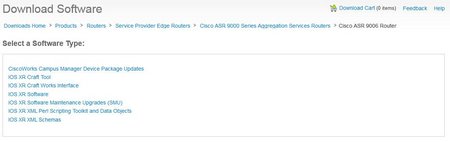
Once you select the IOS XR Software, the most recent version of code will be presented on the screen. Select the version that you need and proceed to download it. If you get an error that a contract is required, please open a Cisco TAC case requesting access, they will need the serial number of the chassis in order to prove support.
Well, time for another IOS XR post, this time on Interface Bundles, particularly Ethernet. With IOS XR a bundle can be considered a group of one or more ports that are aggregated together and treated as one link. The different links within a single bundle can have different speeds, where the fastest link can be up to four times faster than the slowest link. Each bundle has a single MAC, and a single IP address.
As with some other devices, you can have interfaces in a bundle across multiple line cards, thus protecting yourself from a single point of failure. If a line card fails, the bundle interface will stay up as you configured it to span more then 1 card. A bundle also provides you with more bandwidth then might normally be available if using a single interface. Cisco IOS XR supports 802.3ad (LACP) as well as Cisco proprietary EtherChannel. In all honesty, if you use anything other then LACP you are asking for trouble – LACP has prevent many problems when GBICs have gone bad, but the interfaces are still UP/UP.
Ok, time for the meat and potatoes:

Well, it is getting closed to Cisco Live and my schedule is all set – and here it is! Looks like I have some fun times ahead for my, cannot wait to attend some new session.
Sunday | |||
|---|---|---|---|
3:00 PM | GENPS-1628 | Public Sector Open Session | |
Monday | |||
8:00 AM | BRKDCT-2011 | Design and Deployment of Data Center Interconnects using Advanced VPLS (A-VPLS) | |
10:00 AM | BRKSEC-3005 | Advanced IEEE 802.1X | |
1:00 PM | BRKRST-2335 | IS-IS Network Design and Deployment | |
3:30 PM | GENSK-4352 | Solutions Keynote: Technologies Transforming the Data Center: The Evolution… | |
5:30 PM | LABWISP-1000 | Walk-in Self Paced Labs | |
Cisco Live Scoop! CAE Band Revealed! Cover Band Announcement! …and the BAG!
Ok, so what does Windows 95 have to do with Cisco Live? Well, if you remember the one Easter Egg that came with Windows 95, you might remember this video: Cisco Nexus Show Tech-Support – aka TAC-PAC
The inevitable TAC call and the request for a Show Tech to help with the support. Normally this is not a big problem on most systems, but if you ever try this on somehting like a Nexus 7000 – it takes a loooooong time and pulls well over 100 megs of information in that file. Capturing this output to a terminal is a test of patience (lets not mention console), or even if you redirect it to the bootflash it can still take some time. Then, there is getting a 100+ meg file copied from the bootflash to your computer, etc etc etc. I did do a quick post some time ago about using GZip to compress the file – you can find that post here. Cisco Live 2012 – Reasons to attend
Last year I did a post on Why you should go ( you can read it read here ), but since that was for 2011 – I figured I would update it for 2012 as well. I won’t go into as much detail as I did last year, just figure I would refresh some points, provided some 2012 San Diego information, and bullet point some reasons to attend. So, What’s New for 2012 Well, first off the location – this year it is in San Diego, CA. The event tends to move around the country, primarily between a location on the east coast and west coast. For example, next year the event will be in Orlando, FL from June 24-27 (if I recall correctly) – and the year after that I think we are then back to San Francisco in May. By having the event move around it helps to keep things exciting and different, granted Vegas is nice but it does tend to get old quick. | |||