/images/logo.png
A Network Blog by a Network Engineer

New Hosting Provider

digital-ocean-logo-4x3

Just wanted to put out a quick post.  I have moved the site from my old hosting provider to Digital Ocean.   I am still in the process of the migration, so some images may not be working. I am trying to ferret through all the posts to find and fix the missing images.  Please be patient while I work on this.

I moved the site for two main reasons – first reason being that I left my employment at TorreyPoint / Fishnet Security and was hosted by one of their customers.  The second reason is that Digital Ocean uses SSD for their servers and their prices are really good.  They have plans that start at $5  month for a server with 512M and 20G SSD drive – that is perfect for a blog!

Nexus 9000 (MIB Hunting!)

Insieme

Back at Cisco Live 2013, there was some chatter around the Insieme deal and the potential to see a new switch from Cisco during the event.  I think even Greg over at EtherealMind was hoping for some more juicy Insieme announcements at Cisco Live as well ( see post –  http://etherealmind.com/musing-predicting-what-insieme-might-announce-at-cisco-live/ )Well, what we actuall got at Cisco Live was the Nexus 7700 switch and the Gold Cisco 6608 Catalyst Switches, not the hoped for Insieme switch.

Then today I saw that there an article posted over on NetworkWorld ( http://www.networkworld.com/news/2013/100213-interop-cisco-insieme-274455.html ) in regards to the Insieme Nexus 9K and Hardware Defined Networking that caught my attention. There is another article there –  http://www.networkworld.com/community/blog/cisco-nexus-9000-aimed-40g –  that has some output from a 9508 switch as well.

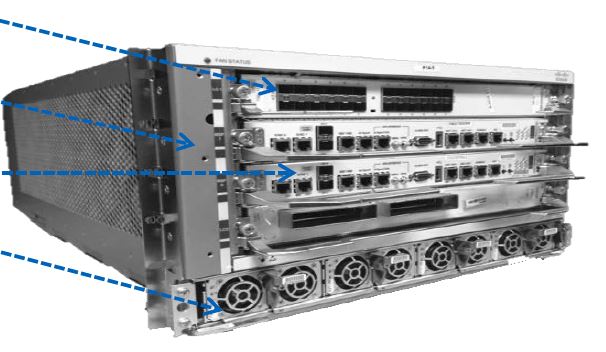
Cisco ASR9904 Series Router

ASR9904

Ok, not new information but kind of new information to share.

Back in June during Cisco Live Orlando 2013 during the session BRKARC-2003 –  Cisco ASR9000 System Architecture there where some slides that discussed a couple new ASR9000 series routers, the ASR9904 and ASR9912.

The ASR9904 is supposed to be released in October ’13,  and that happens to also coincide with the rumored IOS-XR 5.1 release of code.  Well, to date only the ASR9912 has been announced ( http://www.cisco.com/en/US/products/ps13288/index.html ), but with the recent release of the IOS-XR 5.1 Release Notes on Cisco’s website, the ASR9904 is listed there as can be seen in a snippet from that file:  ( the original pdf release notes can be found here http://www.cisco.com/en/US/docs/routers/asr9000/software/asr9k_r5.1/general/release/notes/reln_510a9k.pdf )

VASI – VRF Aware Service Infrastructure Interfaces and Global Route Leaking

Global-routes VASI –  VRF Aware Service Interfaces, what the heck are those?! Cisco has defined a VASI interface as: VASI is implemented using virtual interfaces that provide the framework necessary to configure a firewall and NAT between VRF instances. Each interface pair is associated with two different VRF instances. The two virtual interfaces, called vasileft and vasiright, in a pair are logically wired back-to-back and are completely symmetrical. Each interface has an index. The association of the pairing is done automatically based on the two interface indexes such that vasileft automatically gets paired to vasiright. So you could look at a VASI interface as like a back-to-back connection between VRFs –  call it a virtual cable of sort.  You can also see that the traditional use of a VASI interface is to connect two VRFs, on the same router, together so they can route and NAT between each other.  But what I am saying about Global Route Leaking? Well, recently I had a problem where a client wanted to leak routes, dynamically, from a VRF to the Global table on an ASR1000 with an RP1 installed.  We could easily have done it via a physical cable, but I knew their had to be a better way.  I did some digging on the VASI interface and possible configurations and came across this –  added in IOS XE 3.10S code is the ability to actually BGP peer over the VASI interfaces to exchange routes.
You may click on the image below to view the PDF on this.

Site Maintenance

Just a heads up.  The ISP that this server is hosted at is doing some maintenance this weekend.  The site will be down from Friday night until sometime on Sunday.   (6/22-23/2013)

Dell PowerEdge VRTX (Vertex)

VRTX   While attending the Dell Enterprise Forum last week, Dell announced the PowerEdge VRTX.  The first thing that came to mind when I saw this was the scene in Thor where Natalie Portmans say “Oh….My….God” (Youtube) So, what is this Dell PowerEdge VRTX that has me, and many others, all in a giddy?  Well, it is server that can hold up to 4 blades, has an 8-port L2 gigabit switch, and can support up to 25 – 2.5in HDD (or 12 –  3.5in HDD) drives — that is the potential for 48TB of storage!!  It can be configured in a tower (like pictured above) or in a rack and take up  5 RU of space.  So what you have is a server that utilizes blades, hard-drives, and has 8–port L2 gig switch blade! Oh, best of all, this runs on 110v and is whisper quiet! Talk about perfect for a home lab –  oh yeah!!!!  The only bad part here, the street price is said to be less then $10k, bit out of home-lab money.  But then again, when one thinks of all the hardware and storage that we have in our basements/closets/offices –  that might be close to our pre-existing investment. Looking over my notes from the Dell Enterprise Forum where this device was announced, here is a quick bullet list of what I have:

Dell Enterprise Forum 2013

2013-dell-enterprise-forum If you follow me on Twitter, you no doubt know I was in San Jose, CA attending the Dell Enterprise Forum ( formerly Dell Storage Forum ) last week.  I attended this event on an invite from Dell, and I am so glad I accepted. The event was full of great information and many other great “social media influencers” as we where called.  I have met many of my twitter peers before, but others I had not –  being at the forum allowed me to put faces and real names to twitter handles.  I think having the prior social interaction with them before made this event that much better.  It was great of Dell to bring us together to listen, learn, and share ideas. So, the purpose of this post is to recap the week, point out some highlights, some low, and set the stage for another post or two.

The whole theme of the event seemed to be around Ordinary -> Optimized.  Dell would show and present Ordinary things, and then how they Optimized them.  It was a theme they kept moving in all that they did.  From the legos laying around in the lounge area, the old Atari 2600 systems, to a full wall sized modern Tetris game.  They showed Ordinary and then Optimized it! 

F5 Certifications – F5 Certified Administrator

F5_CA_lg

Ahh, Certifications!  The thing that drives many of us to learn new things as well as show what we have learned.

Recently at work there was a request for some of us to get F5 certified and I figured what the heck. I have had some exposure to F5 Load Balancers in the past and have also had some intimate times other vendors products.  So, I figured I would take the time and focus on the F5 product and obtain the certification  I was much more challenging that I thought it would be –  but it was fun!

It seems as though F5 recently revamped their certification guidelines, testing procedures, and tests.   I do not know exactly when they started to revamp them, but I know it was recent based on the BIG-IP Certification Administrator going live on 3/18/13.  Based on this, the material available to study is few and far between as well many have not been exposed to the Professional Pearson Vue centeters that F5 users to administer the test.  I will cover the Pearson Professional centers as part of this post and will focus on the required tests (101 and 201) in separate posts.  There is just two much information for one post!

Cisco Live Blogger Contest

Blog

Love to blog?  Going to Cisco Live in June? Want to have a chance to win a free four-hour lab or technical session?  Well then, read on!

Oh, and if you have never taken a 4–hour lab or technical session, they are wonderful.  These are sessions that cost extra and are not part of the normal conference fee.  I believe they are to take place on Sunday, June 23rd.

Open Networking Summit 2013

7f5bf15278ec1421d3a8df72eabf97d5

Ok, this post is a bit out of the ordinary for me, but I wanted to pass along some information that was sent to me and post it as a “guest-post”.  I will be attending the ONS Summit next week as part of the company that I work for, Torrey Point – Full-Service Network Consultancy, as a paid participant.  I wanted to share this post with you in the case that you would be attending, perhaps we can meet up when time allows.

–  Fryguy

Software Defined Networking (SDN) is the buzzword on the mind of every player in the networking and telecom ecosystem; promises to revolutionize networking as we know it and will affect service provider networks, cloud networks and enterprise networks.


Open Networking Summit (ONS) 2013 is the premier conference for SDN and Open Flow and has established itself as the leading event to ‘plug-in’ to SDN.