Junos – eBGP Juniper to Cisco (and some MD5)

Ok, time for some eBGP between Cisco and Juniper
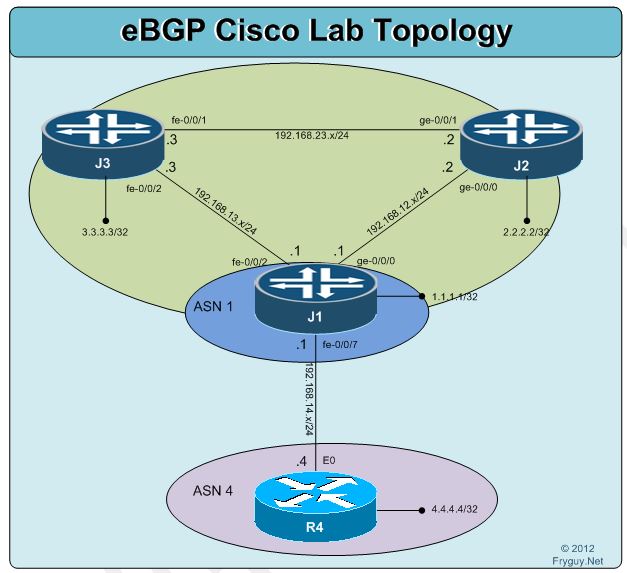
Before we begin this lab, reset all the configs back to the rescue/base before beginning.
Ok, let’s configure our J1-J2-J3 OSPF Configuration.
J1:

Ok, time for some eBGP between Cisco and Juniper
Before we begin this lab, reset all the configs back to the rescue/base before beginning.
Ok, let’s configure our J1-J2-J3 OSPF Configuration.
J1:

Time for some eBGP between Juniper devices
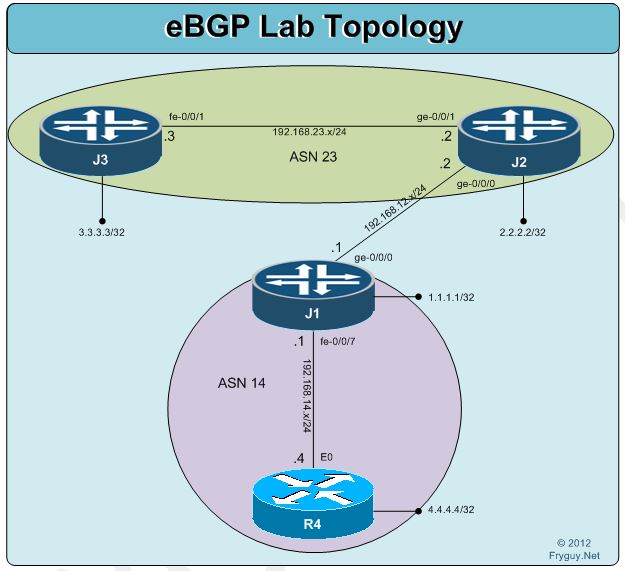
Ok, time for some eBGP configurations. Of course, first thing we need to do – reset to the rescue/base configs. You can do that now.
We will create an iBGP session between J1 and R4 using ASN 14 and we will also create an iBGP session between J2 and J3 using ASN 23.

Ok I finally tried it – swapping in a T-Mobile SIM into an Apple iPad Air that was running a AT&T SIM for cellular data – and you know what, it works!
It was as easy as ording a Bring your own tablet T-Mobile Nano SIM at – http://prepaid-phones.t-mobile.com/sim-card?cm_sp=tmo_landingpage-_-yorktown-_-prepaidSIM
I got the card in a few days, popped out the AT&T SIM and insterted the T-Mobile SIM and set the SIM up for the iPad.
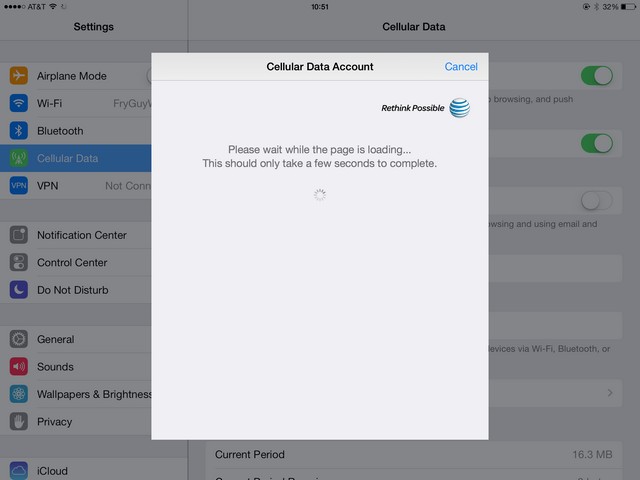
Here are some quick screen shots after I swapped the nano sim. I used a paper clip to pop the old one you, worked well.
First – screen shot of my iPad with the ATT Cellular Data

Now time for some iBGP with Cisco and Juniper
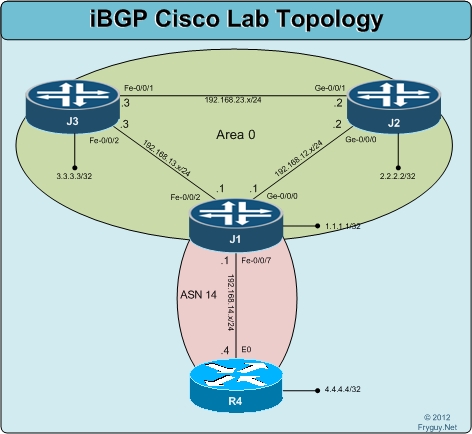
Ok, again we need to reset the lab to the rescue config on J1, J2 and J3, and load the base on R4.
Now that you have done that, we can configure OSPF area 0 on J1, J2, and J3. We will advertise the loopbacks into OSPF as well.
J1:
jfry@J1> edit
Entering configuration mode
[edit]
jfry@J1# edit protocols ospf area 0
[edit protocols ospf area 0.0.0.0]
jfry@J1# set interface ge-0/0/0
[edit protocols ospf area 0.0.0.0]
jfry@J1# set interface fe-0/0/2
I have been using the Cisco CSR1000V for my home lab setup for a little bit now. There have been some questions on how to set this up for a home lab and I figured I would cover how I am using it.
For this post, here is what we are going to build – a three (3) node CSR1000V network and three (3) vSwitch Networks to connect the CSR1000Vs together. We will also configure the CSR1000V to have connectivity back to the “home production” network so that we can SSH/Telnet to these routers when we are labbing.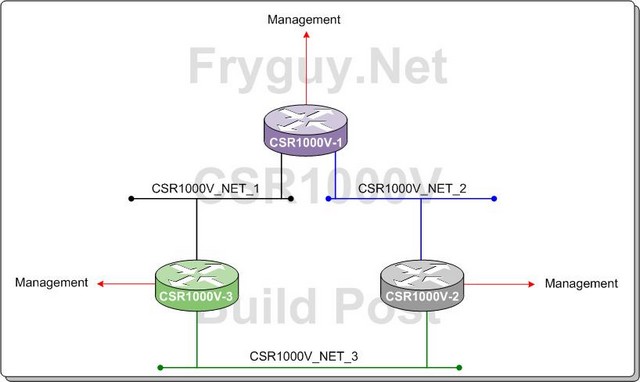
To obtain the Cisco CSR1000V you need to download it from Cisco at this LINK and click on the Download software as seen circled below

Ok, time for some BGP Route Reflectors!
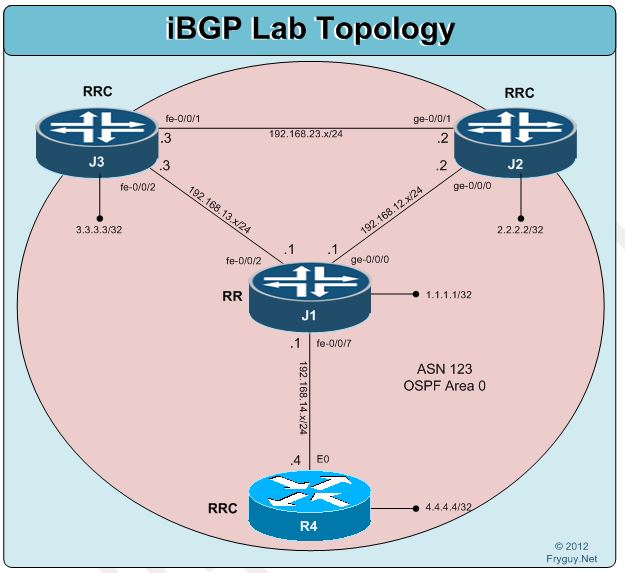
Now onto BGP Route-Reflectors. For this lab our IGP will be OSPF, our BGP will be done via the connected interfaces, J1 will be the RR, and we will advertise our loopbacks into BGP.
First though, reset the lab to the rescue config on J1, J2 and J3, and load the base on R4.
Ok, now to configure OSPF and BGP on R4:
R4#conf t
Enter configuration commands, one per line. End with CNTL/Z.
R4(config)#router ospf 123
R4(config-router)#no au
R4(config-router)#net 192.168.14.0 0.0.0.255 a 0

Ok, time for some iBGP!
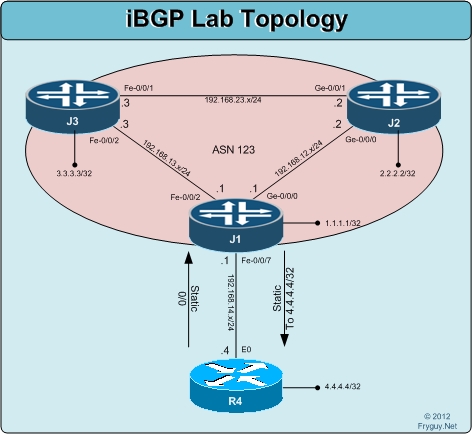
Ok, BGP time. First thing we need to do is rollback all configs to the base. You should be Ok with doing that now on your own, so I will skip documenting that again here. Again, all configs, J1 – J2 – J3 – J4, are all back at their base/rescue level.
Now we need to configure R4 with a static default route to J1 for this lab.
R4#conf t
Enter configuration commands, one per line. End with CNTL/Z.
R4(config)#ip route 0.0.0.0 0.0.0.0 192.168.14.1
R4(config)#^Z
Now we can configure a static route on J1 to R4 4.4.4.4/32
[edit]
jfry@J1# set routing-options static route 4.4.4.4/32 next-hop 192.168.14.4 install
[edit]
jfry@J1# commit and-quit

Time for some multi-protocol labs!
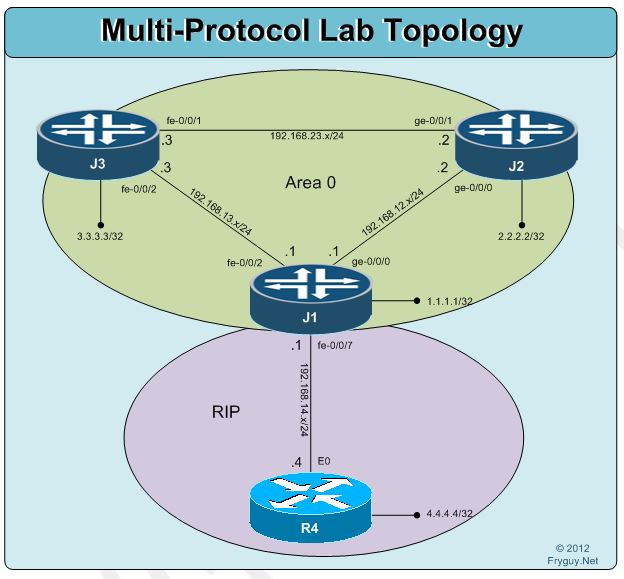
Ok, we have done RIP and we have done OSPF. Now time to put them together!
For this lab the Juniper devices will be in OSPF Area 0 and the Cisco device will be in RIP. J1 will sit in both RIP and OSPF and handle the redistribution between the protocols.
First up, we need to restore R4 config to our base and remove fe-0/0/7 from Area 1 on J1.
R4:
R4#configure replace flash:base.txt
And J1:
[edit]
jfry@J1# delete protocols ospf area 1 nssa
[edit]
jfry@J1# delete protocols ospf area 1 interface fe-0/0/7
[edit]
jfry@J1# commit and-quit
Ok, that is done. Time to configure RIP on R4 and J1.

Time for the next Junos post!
Here is our lab image for this post.
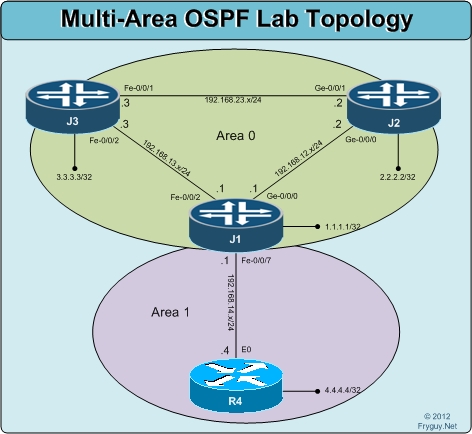
Ok, first thing we need to do is rollback to our rescue config so we start on a clean slate:
R4:
R4#configure replace flash:base.txt
J1:
[edit]
jfry@J1# rollback rescue
load complete
[edit]
jfry@J1# commit and-quit
commit complete
Exiting configuration mode
J2:
[edit]
jfry@J2# rollback rescue
load complete
[edit]
jfry@J2# commit and-quit
commit complete
Exiting configuration mode

Here is our diagram for this lab
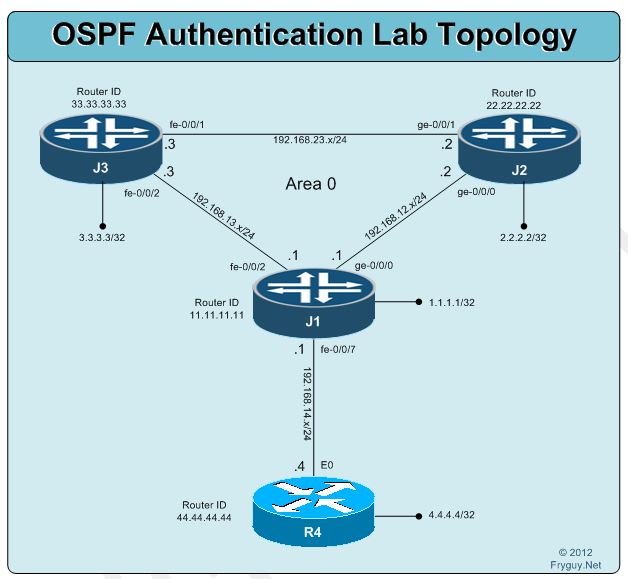
For this lab we will configure authentication for Area 0
First up some quick housecleaning
J1:
[edit]
jfry@J1# delete protocols ospf area 0 interface fe-0/0/7 authentication
[edit]
jfry@J1# commit and-quit
commit complete
Exiting configuration mode
jfry@J1>
and R4
R4(config)#int e0
R4(config-if)#no ip ospf authentication
R4(config-if)#no ip ospf message-digest-key 1
R4(config-if)#^Z