/images/logo.png
A Network Blog by a Network Engineer

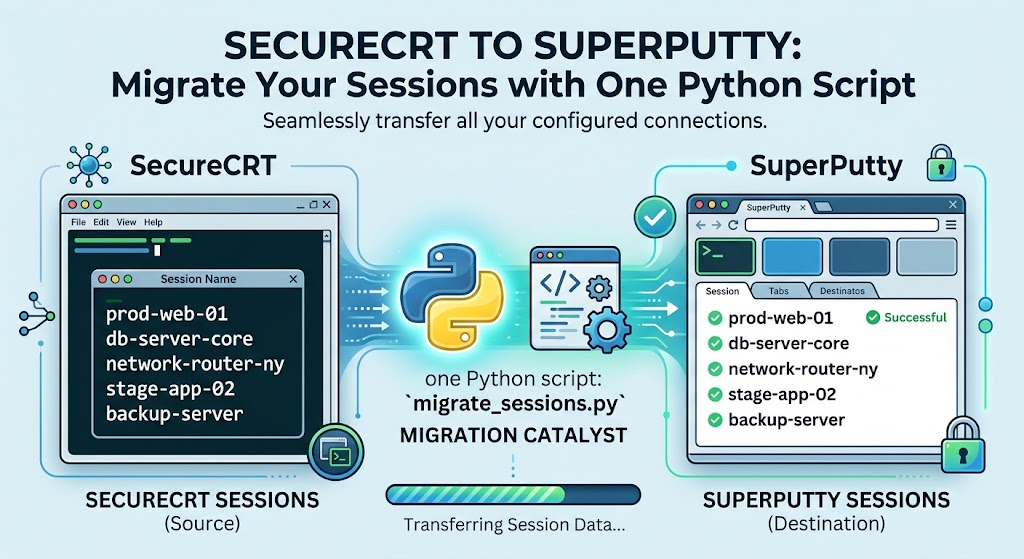
SecureCRT to SuperPutty – Migrate Your Sessions with One Python Script

If you’ve ever had to move a large session library from SecureCRT to SuperPutty, you know the pain — there’s no built-in migration path, and manually re-entering dozens (or hundreds) of sessions is a miserable afternoon. I wrote SCRT_2_SPUTTY to handle it automatically. Point it at your SecureCRT XML export, and it spits out a ready-to-import SuperPutty XML file. No third-party libraries, no configuration files — just Python and a single command.

UniFi Network Health Report – Open Source Python Tool (v1.0.0)

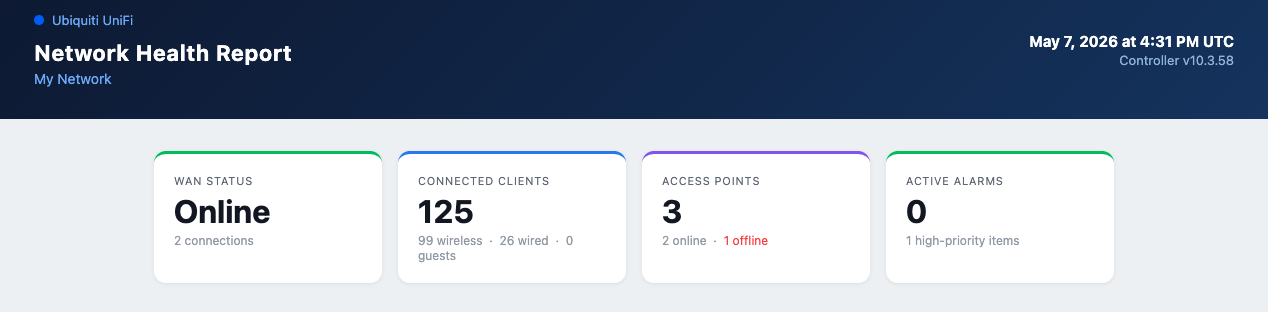
If you run a self-hosted Ubiquiti UniFi network — whether it’s a home lab, small business, or multi-site setup — you know the UniFi dashboard is great for real-time monitoring but falls short when you want a clean summary you can save, share, or review later. I built UniFi Network Health Report to fill that gap: a Python tool that connects to your controller and generates a standalone HTML report covering everything that matters.

Juniper Port Checker – Validate Port Speed Mappings Before You Deploy

If you work with Juniper hardware and have never used the Juniper Port Checker, you are missing out on a really useful tool. It is part of the Juniper Pathfinder suite and it gives you a visual representation of the front panel of a device and lets you configure port speeds to validate that your planned configuration is actually supported by the hardware. No more digging through data sheets trying to figure out what happens to adjacent ports when you change a speed.

New Network Tools Section

I have been meaning to put together some network tools for a while now, and I finally got around to it. I added a new Network Tools section to the site with eight tools that I find myself needing on a regular basis. They all run in the browser – nothing gets sent to a server, they either do the math locally or call a public API directly.

EX4400 VC Ports Conversation

This week I am in the Juniper Campus Networks with Mist AI ( JCMA ) course and going over the labs. I ran into a problem where the EX4400-24T et-0/1/0 and et-1/1/1 ports did not appear in in the Junos configuration nor the Mist portal. The configuration was in the portal via the templates, but the ports did not exist on the switch.

I have seen similar conditions as these ports can also be used for the Virtual Chasis (VC) ports. What I did find interesting is that the normal way I have always changed VC-Ports on Junos did not work.

First, let us look at the vc-ports on this EX4400-24T:

{master:0}
lab@ex2> show virtual-chassis vc-port 
fpc0:
--------------------------------------------------------------------------
Interface   Type              Trunk  Status       Speed        Neighbor
or                             ID                 (mbps)       ID  Interface
PIC / Port
1/0         Configured         -1    Down         50000
1/1         Configured         -1    Down         50000
1/2         Configured         -1    Down         50000
1/3         Configured         -1    Down         50000

As you can see, we have 4 VC-Ports configured on Pic 1 – Ports 0-3.

Cisco Live 2022 – Are you ready?

Soon, many of us will be on an airplane heading to Las Vegas for Cisco Live 2022. So I felt that it might be good to put out some final information before we head out. Below you will find some info on the Cisco Events App, Health and Safety info, as well as NetVet reception updates.

Cisco recently updated its Cisco Events application for Cisco Live 2022, this is a must-have application for an attendee. This application is your go-to for everything CIsco Live, as you can see from the images below, it has all the relevant information you need – the Session Catalog, the All Sessions section has your Schedule for the sessions you have signed up for as well.

Cisco Cat9300X – Tech Field Day

The other week I had the privilege of participating in Tech Field Day Exclusive with Cisco 2022. One of the presentations that I enjoyed was the talk on the C9300X. I think this is because I am currently working heavily with them on a current project

As I said, the Cisco Catalyst 9300 is a switch family that I am familiar with due to my current work environment. I have deployed all different models from C9300-48U-A, C9300-48UN-A, to the C9300-48UXM-A. They have been a reliable switch from my experience, albeit a bit of pain due to the interface naming differences between the models. ( that is another blog post altogether )

Cisco Enterprise Networks Presents at Tech Field Day Exclusive with Cisco 2022

I am honored to be welcomed back to Tech Field Day Exclusive with Cisco scheduled on 16-17 March 2022. It will be a live-streamed event that you can watch over on the Tech Field Day site during the event, or on their YouTube channel shortly after.

The schedule for the event is as follows:

Wed Mar 1611:00a – 2:00p ESTCisco Enterprise Networks
Wed Mar 162:00p – 5:15p ESTCisco Meraki
Thurs Mar 1711:00a – 4:00p ESTCisco

See you there!

Cisco Live 2022 – Good vibes again!

It should be safe to say that most of us have had a tough time these past two years, no matter what our view of things – the world has changed around us. We all have been learning to adapt, understand, and cope with what has happened. I am sure that we are all looking to get back to some normalcy in our lives.

“Troubles, they may come and go, but good times, they're the gold.”
― Dave Matthews Band

In the past one of our normalcies has been an event called Cisco Live – or Nerd Camp as some of us have come to affectionately call it. It is a place where you gather with friends who share the same passions, a place where you make new acquaintances, and ultimately a place where we learn new technologies together for the networking world.

Our last in-person event was in 2019 in San Diego, CA – since then Cisco Live has been forced to go online only due to the changes in the world Granted we still got our dose of new technology learning from a firehose with the online sessions, but they are just not the same as being in a classroom setting listening to the speaker. Online sessions are missing the human touch that we get by being in person at the event, by asking questions in the session, by conversing with the speakers after the session, and ultimately by connecting to our peers in the session. Online sessions are missing the interactions we can gain when we are together.


“I'll lean on you and you lean on me and we'll be okay.”
― 
Dave Matthews Band

Cisco Live 2021 – Online

It is that time of year again, just not quite the same as it once was. Once again Cisco Live has been forced to be on-line only due to the pandemic, let us just hope this is the last time as I miss seeing everyone – as I am sure you all do as well.

In case you missed it, Cisco Live is going to be at the end of this month ( March ) for 2-days – the 30th and 31st. This year, unlike last year, there are two pass options – one Explorer (Free) and another All Access ($349). Both seem to give you access to the basics, but the All-Access pass will include the technical sessions. You can see more about the registration here: Registration Packages.